
Streamline your 
Change Management

with

ECM-Go solution integrates seamlessly with your existing systems, centralizing all data and communications on a single, connected platform. Designed to be fast, frictionless and connected – fully customizable to fit your business. 

What is ECM-Go?

ECM-Go is a web-based service that enables organizations to manage engineering changes across departments and systems without replacing existing PDM or ERP solutions, but by adding an additional layer of control.

As a platform for Engineering Change Management across PLM and ERP systems, ECM-Go ensures product and process changes are controlled, traceable, and efficiently executed. However, at BoostPLM, we take this further through Enterprise Change Management, extending change processes across the entire organization and enabling true cross-functional collaboration.

As a result, ECM-Go helps industrial companies reduce time to market, lower costs, and minimize the risks associated with product and process changes. Explore its key features and request a guided tour to see it in action.

Explore Key Features

Centralized Information

All change-related data, discussions, and documents connected in one unified workspace.

Real-Time Collaboration

Enable cross-functional collaboration with integrated communication and workflows.

Efficient Change Handling

Manage, prioritize, bundle, and coordinate changes in one connected process.

Impact Analysis

Understand product, logistics, and cost impact before changes are implemented.

Structured Planning

Coordinate timelines, tasks, and responsibilities with clear and automated planning tools.

Seamless Integrations

Connect ECM-Go with systems like SAP and Windchill for a continuous flow of change data.

Deep Integrations with Core Systems

Seamlessly connect ECM-Go with your existing enterprise systems, enabling smooth data exchange, reduced manual effort and a unified operational workflow across platforms.

Operational Impact Analysis

Gain clear visibility into the performance and business impact of your ECM processes, with actionable insights that help you identify inefficiencies, track improvements and optimize outcomes over time.

Explore the functionalities of

The basic module of our ECM solution is your central hub for managing and tracking e.g. Engineering Change Requests (ECR) and Engineering Change Orders (ECO).

This intuitive module allows you to customize and display exactly the information relevant to your workflow. Easily attach essential documents or files directly to each ECM object, ensuring quick access when needed.

Here, you can also quickly create new ECRs or ECOs, simplifying your processes and improving communication across teams. Keep your engineering changes organized, accessible, and always up-to-date.

The Search module helps you easily locate, filter, and manage your engineering change objects efficiently. Create personalized filters tailored to your needs and share them with your team to ensure everyone remains aligned and informed.

Color-coded filters simplify tracking and provide clear visual organization, allowing you to quickly identify and group objects based on their status or other attributes.

Key details clearly displayed for each object include object number, creator, creation date and time, current status, version, title, segment, and platform. This structured overview ensures you have quick access to the essential information needed for informed decision-making and streamlined workflows.

The Plan Module provides an organized view of all tasks linked to a specific engineering change object. You can easily track task details in two complementary ways:

The task table offers a clear overview, listing essential task information such as Task ID, title, description, assignee, predecessors, start date, due date, duration, and current status.

Additionally, a visual Gantt chart illustrates task timelines, dependencies, and progress, allowing you to quickly grasp the overall project flow and deadlines. This combined approach ensures effective planning, coordination, and management of your engineering changes.

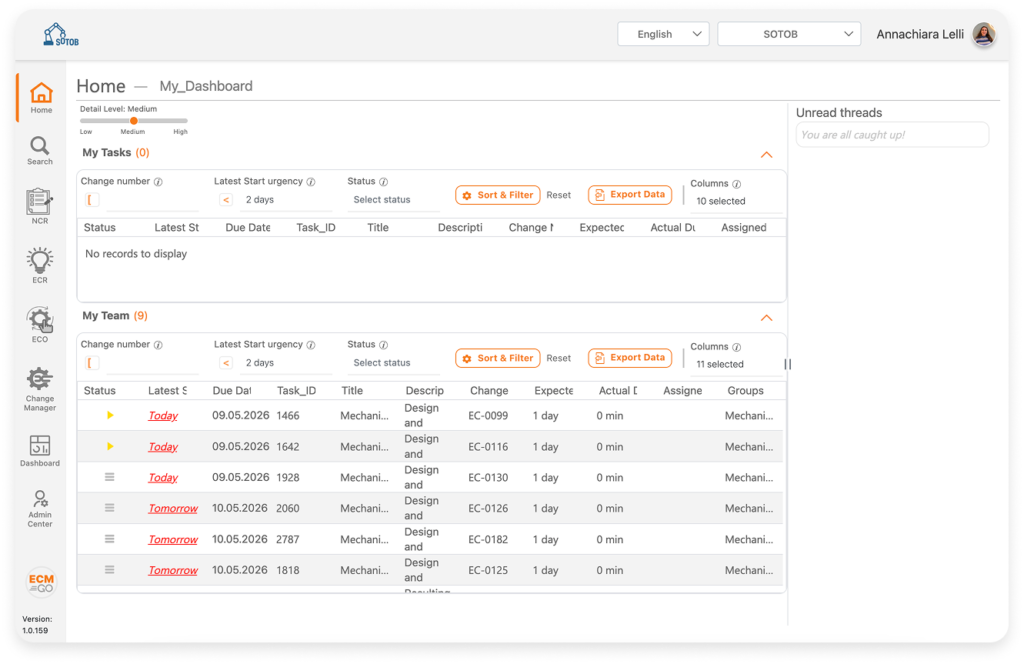
The “My Tasks” overview provides a personalized view of all your assigned tasks related to engineering changes.

Easily manage your workload with a clear and structured table displaying task details including ECM type, master object, task title, description, required state, task status, start date, due date, and duration (days). 

This streamlined layout ensures you stay organized and efficiently track the progress of your tasks.

Contact Us

Request your ECM-Go demo